Skip to content
SkillOS Labs Inc IconSkillOS
Quick StartMarketplaceRegistryAnswersConnectors
Sign inGet started free
SkillOS Labs Inc IconSkillOS

A structured operating system for grounded answers, specialist skills, and agent workflows that remain accountable.

Apache 2.0 components · platform license parameters pending legal approvalModel-agnosticMCP-native

Platform

  • Marketplace
  • Workflow Templates
  • Skill Registry
  • Answer Studio
  • Connectors
  • Skill Studio
  • Connect IDE

Docs

  • Getting Started
  • CLI Reference
  • SDK Guide
  • SDS Standard
  • MCP Integration

Verticals

  • All Verticals
  • Healthcare
  • Fintech
  • Legal
  • Cybersecurity

Project

  • GitHub
  • Changelog
  • Community
  • Contributing
  • Support & Help
  • Pricing
  • Governance

Legal

  • Terms
  • Privacy

© 2026 SkillOS Labs Inc contributors.

Built for evidence, ownership, and follow-through.

Documentation
Integration

MCP Integration

SkillOS Labs Inc exposes its currently advertised tool inventory through the Model Context Protocol (MCP). AI clients like Cursor, Claude Desktop, and VS Code can access the capabilities that the deployed gateway advertises, subject to authentication, entitlement, and provider configuration.
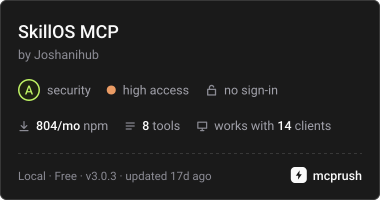
SkillOS MCP assessment badge from mcprush

SkillOS MCP is listed on mcprush. The badge reflects the publisher's reported grade; review the listing for its assessment scope and findings. It does not certify the entire SkillOS platform or guarantee that it has no vulnerabilities.

Common Issue: HTTP 403 Forbidden

The SkillOS MCP server requires API key authentication. Most default configurations don''t include the authorization header, causing 403 errors.

📖 Complete setup guide with troubleshooting: MCP-SETUP.md

Quick Setup (3 Steps)

STEP 1

Get Your API Key

Log in to founderskillos.xyz → Settings → API Keys → Copy your key (format: sk-os_...)

STEP 2

Set Environment Variable

# Windows (PowerShell)
$env:SKILLOS_API_KEY = "sk-os_YOUR_KEY_HERE"

# macOS / Linux
export SKILLOS_API_KEY="sk-os_YOUR_KEY_HERE"
STEP 3

Configure Your MCP Client

Add the SkillOS server configuration to your AI client''s MCP config file (see examples below).

⚠️ Important: Each client uses different variable syntax. See the complete setup guide for client-specific instructions.

Architecture

The SkillOS MCP server uses the Streamable HTTP transport at /api/mcp on the configured site origin. The gateway advertises its supported protocol versions and tools dynamically; local source supports both the legacy and modern adapters, while a deployed environment must be checked after each release. The live tool list below shows what this deployment exposes; it does not imply that a provider, credential, entitlement, or external integration is configured.

Skill activation and user-scoped tools require an authenticated Authorization: Bearer sk-os_... header. Discovery calls such as tools/list are public. MCP clients reference the API key using environment variable syntax (e.g., \${env:SKILLOS_API_KEY} in Cursor).

Legacy JSON-RPC 2.0 Handshake (2025-03-26)

Streamable HTTP
→ Client sends:   POST /api/mcp (Authorization: Bearer sk-os_...)
                  Accept: application/json, text/event-stream
                  MCP-Protocol-Version: 2025-03-26
                  { "jsonrpc": "2.0", "method": "tools/list", "id": 1 }

← Server responds: Content-Type: application/json
                  { "jsonrpc": "2.0", "id": 1,
                    "result": { "tools": [/* current tool definitions */] } }

→ Client sends:   { "jsonrpc": "2.0", "method": "tools/call",
                     "params": { "name": "activate_skill", 
                                 "arguments": { "skill_name": "software_architect" } } }

← Server responds: Full SDS system prompt + metadata

Status codes:
  200 OK       - JSON-RPC response; inspect result.isError for tool failures
  4xx/5xx      - HTTP or protocol-level rejection

Modern stateless requests (2026-07-28)

Modern clients use server/discover instead of the initialize handshake. The official client SDK handles protocol discovery and required routing headers. The same authenticated tool dispatcher and entitlement checks serve both protocol versions.

→ Modern client sends: POST /api/mcp
  MCP-Protocol-Version: 2026-07-28
  Mcp-Method: server/discover
  { "jsonrpc": "2.0", "method": "server/discover", "id": 1, "params": { "_meta": { "io.modelcontextprotocol/protocolVersion": "2026-07-28", "io.modelcontextprotocol/clientInfo": { "name": "client", "version": "1.0" }, "io.modelcontextprotocol/clientCapabilities": {} } } }

→ Tool calls carry the same per-request _meta envelope plus matching
  Mcp-Method: tools/call and Mcp-Name: <tool-name> headers.

← Discovery, tools/list, and tools/call use stateless JSON-RPC exchanges.
  Authentication and tool errors follow the same policies as the legacy path.

Tool inventory from this deployment

Endpoint: /api/mcp. The list below is fetched from tools/list; it does not imply that every tool is configured, authorized, or operational.

Client Configuration Examples

Each MCP client has a slightly different configuration format. These examples show the correct syntax for popular clients. For complete setup instructions, including environment variable configuration and troubleshooting, see MCP-SETUP.md.

Cursor

.cursor/mcp.json (project) or ~/.cursor/mcp.json (global)
{
  "mcpServers": {
    "skillos": {
      "url": "https://founderskillos.xyz/api/mcp",
      "headers": {
        "Authorization": "Bearer ${env:SKILLOS_API_KEY}"
      }
    }
  }
}

Claude Code

.mcp.json (project) or ~/.claude.json (user)
{
  "mcpServers": {
    "skillos": {
      "type": "http",
      "url": "https://founderskillos.xyz/api/mcp",
      "headers": {
        "Authorization": "Bearer ${SKILLOS_API_KEY}"
      }
    }
  }
}

VS Code

.vscode/mcp.json or user profile mcp.json
{
  "inputs": [
    {
      "type": "promptString",
      "id": "skillos-api-key",
      "description": "SkillOS API Key",
      "password": true
    }
  ],
  "servers": {
    "skillos": {
      "type": "http",
      "url": "https://founderskillos.xyz/api/mcp",
      "headers": {
        "Authorization": "Bearer ${input:skillos-api-key}"
      }
    }
  }
}

Windsurf / Devin Desktop

mcp_config.json
{
  "mcpServers": {
    "skillos": {
      "serverUrl": "https://founderskillos.xyz/api/mcp",
      "headers": {
        "Authorization": "Bearer ${env:SKILLOS_API_KEY}"
      }
    }
  }
}

Claude Desktop (Remote Connector)

Settings → Connectors → Add Custom Connector
URL: https://founderskillos.xyz/api/mcp
Authentication: Sign in when needed
Provider: SkillOS Labs Inc

Troubleshooting

Common issues and solutions:

  • 403 Forbidden: API key not configured or incorrect variable syntax
  • 401 Unauthorized: Invalid or expired API key
  • Variable not expanding: Environment variable not set before client started
  • Connection timeout: Firewall or corporate VPN blocking endpoint

📖 Complete troubleshooting guide: MCP-SETUP.md → Troubleshooting

SDS StandardBack to tutorial →